SQL LEFT JOIN and RIGHT JOIN
Keep every row from one table even when the other table has no match.
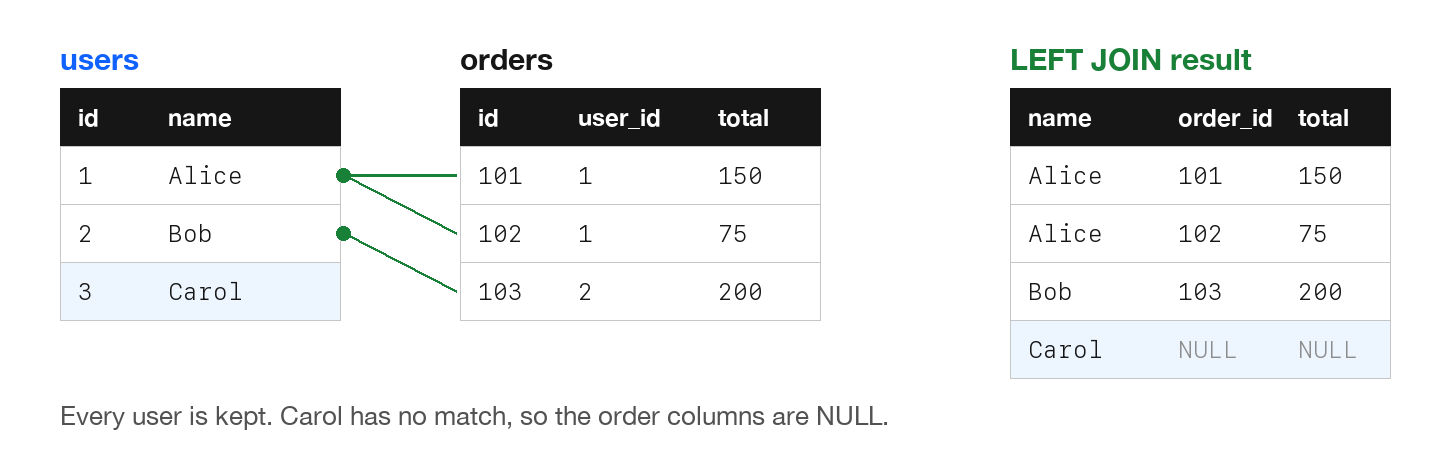
LEFT JOIN returns all rows from the left table, plus matching rows from the right table. If there's no match, NULL values are returned for right table columns.
LEFT JOIN Syntax
SELECT columns
FROM left_table
LEFT JOIN right_table ON left_table.col = right_table.col;
LEFT JOIN Example
-- Get ALL users, with their orders if any
SELECT
    u.name,
    o.id AS order_id,
    o.total
FROM users u
LEFT JOIN orders o ON u.id = o.user_id;

-- Result:
-- Alice | 101  | $150
-- Alice | 102  | $75
-- Bob   | 103  | $200
-- Carol | NULL | NULL   <-- Included even with no orders!
Finding Records Without Matches
-- Find users who have never placed an order
SELECT u.name, u.email
FROM users u
LEFT JOIN orders o ON u.id = o.user_id
WHERE o.id IS NULL;

-- Result: Carol (the only user with no orders)
RIGHT JOIN
RIGHT JOIN is the opposite - all rows from the right table, plus matches from the left:
-- All orders, even if user was deleted
SELECT u.name, o.id, o.total
FROM users u
RIGHT JOIN orders o ON u.id = o.user_id;

-- Equivalent using LEFT JOIN (preferred):
SELECT u.name, o.id, o.total
FROM orders o
LEFT JOIN users u ON u.id = o.user_id;
Note: Most developers prefer LEFT JOIN and just switch the table order. SQLite added RIGHT JOIN in version 3.39.0. On an older version, use LEFT JOIN with the tables swapped.
Try It Yourself
These examples use the users and orders tables from the introduction to JOINs. The LEFT JOIN example returns:
name   order_id  total
-----  --------  -----
Alice       101    150
Alice       102     75
Bob         103    200
Carol  NULL      NULL