SQL INNER JOIN
Return only the rows that have matching values in both tables.
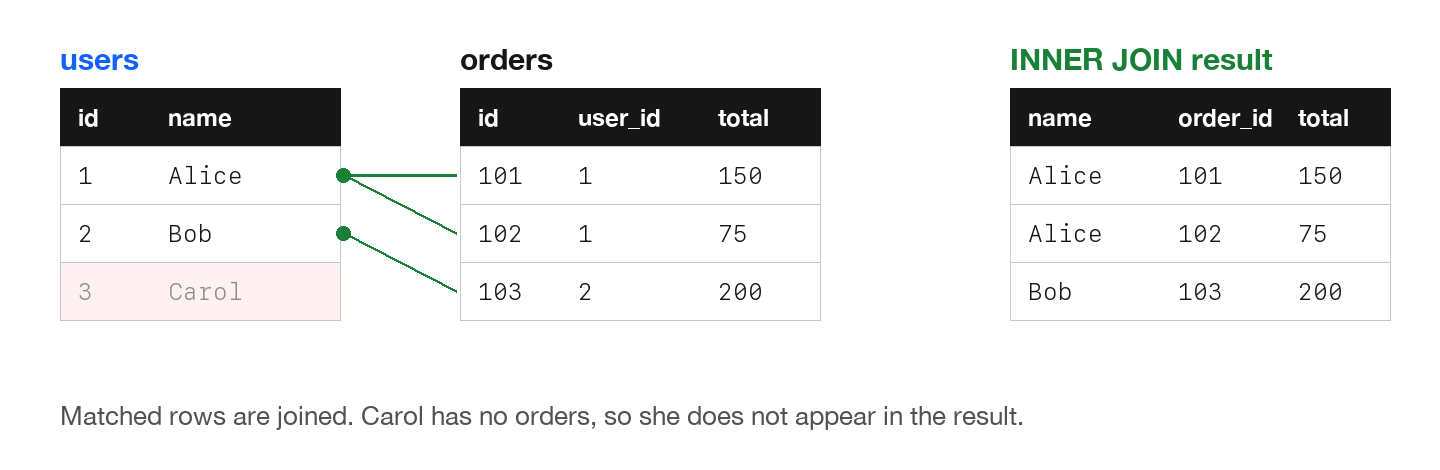
INNER JOIN returns only rows that have matching values in both tables. Rows without a match are excluded from results.
Basic Syntax
SELECT columns
FROM table1
INNER JOIN table2 ON table1.column = table2.column;

-- JOIN is shorthand for INNER JOIN
SELECT columns
FROM table1
JOIN table2 ON table1.column = table2.column;
Example
-- Get users with their orders
SELECT
    users.name,
    users.email,
    orders.id AS order_id,
    orders.total
FROM users
INNER JOIN orders ON users.id = orders.user_id;

-- Result:
-- Alice | alice@mail.com | 101 | $150
-- Alice | alice@mail.com | 102 | $75
-- Bob   | bob@mail.com   | 103 | $200
-- (Carol is NOT included - she has no orders)
Using Table Aliases
-- Shorter and cleaner with aliases
SELECT
    u.name,
    u.email,
    o.id AS order_id,
    o.total
FROM users u
INNER JOIN orders o ON u.id = o.user_id;
With WHERE Clause
-- Filter after joining
SELECT u.name, o.total
FROM users u
INNER JOIN orders o ON u.id = o.user_id
WHERE o.total > 100;

-- Result: Only Alice with $150 and Bob with $200
When to use: When you only want records that exist in both tables. Most common JOIN type.
Try It Yourself
The examples use the users and orders tables from the introduction to JOINs, which includes the CREATE TABLE and INSERT statements. This is the output of the first example when you add ORDER BY orders.id:
name   email           order_id  total
-----  --------------  --------  -----
Alice  alice@mail.com       101    150
Alice  alice@mail.com       102     75
Bob    bob@mail.com         103    200