SQLite
An empty SQLite file does not mean your data is gone
One typo in a filename can send you into a brand-new database. Start by opening the existing file read-only.
Published 4 min read
Jump to the read-only commands
Photo: Smartphone display screen, Skitterphoto, CC0, via Wikimedia Commons.
You were given shop.db. You type sqlite3 shpo.db, run .tables and see nothing. It looks as though someone sent an empty database. In this example, you opened a different name.
SQLite can open a new database when the path does not exist. If you are inspecting somebody else's file, read-only mode gives you a better failure: a missing file stays missing.
Open an existing SQLite file read-only
sqlite3 -readonly /absolute/path/to/shop.dbReplace the path with the file you have. Quote it if it contains spaces. If the sqlite3 command is unavailable, install the official SQLite command-line tools or use a database viewer with a read-only option.
.databases
.tables
.schema
.databases confirms the opened path. .tables lists tables and views, and .schema prints definitions. These are shell commands, so they do not need SQL semicolons.
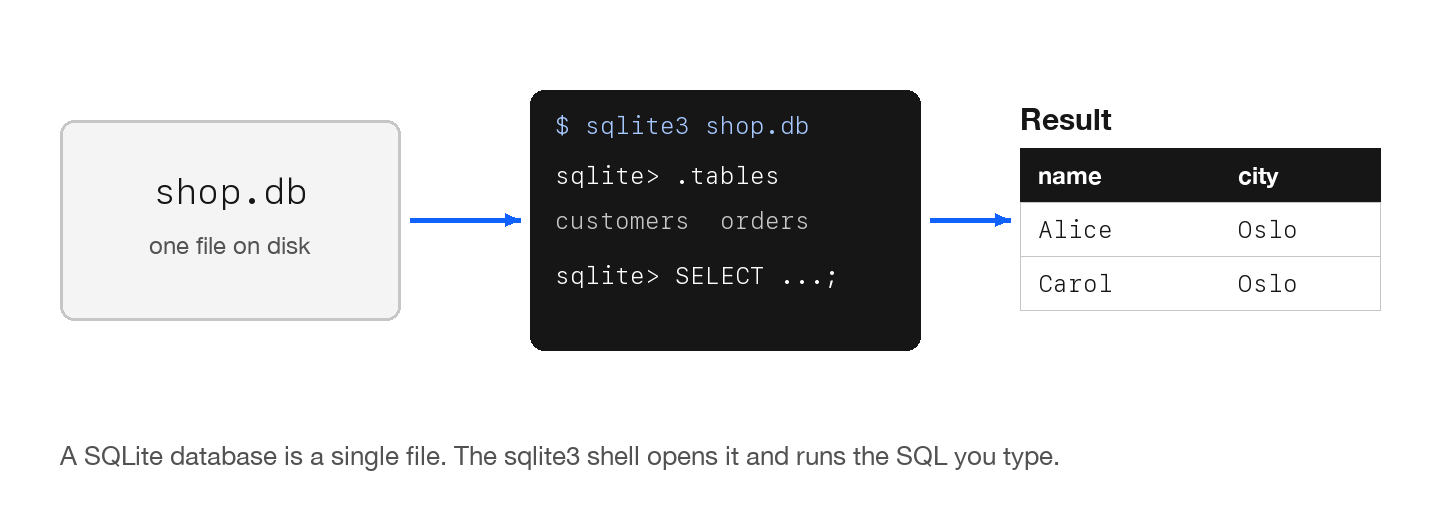
Read a few rows
After identifying a real table name, inspect a small sample. This example assumes a customers table with an id column.
.headers on
.mode column
SELECT * FROM customers ORDER BY id LIMIT 10;
Use a table and ordering column from your own schema. Read-only mode blocks writes through that connection. It does not freeze changes made by another application.
Open it with Python instead
If your Python installation includes sqlite3, a URI with mode=ro opens an existing file without write access.
from pathlib import Path
import sqlite3

path = Path('/absolute/path/to/shop.db').resolve()
con = sqlite3.connect(path.as_uri() + '?mode=ro', uri=True)
try:
    for row in con.execute(
        "SELECT name FROM sqlite_schema WHERE type='table' ORDER BY name"
    ):
        print(row[0])
finally:
    con.close()
If the file still looks wrong
The extension is not proof of the format. Applications use .db, .sqlite and other names for SQLite, and may use .db for unrelated formats too. A file-format error can mean the wrong file, corruption or an encrypted database that needs its application's tooling.
For a database in WAL mode, committed changes can still be in the -wal file. Do not detach it from the main file or copy a set of changing files one at a time and assume the result is consistent. Ask the owning application for an export or use SQLite's backup API or shell backup command.
Make a consistent copy for inspection
.backup '/absolute/path/to/new-inspection-copy.db'Choose a new destination path. The backup command writes a copy even if the source connection is read-only, provided it can read the source and write the destination. Open that copy for repeatable inspection. Backup errors or locking problems need resolving before you trust the copy.
SQLite file questions
- Are .db and .sqlite different SQLite formats?
- The extension alone does not determine the format. Either can name a SQLite file, and .db can also name something else.
- Why does .tables show nothing?
- Check the opened path with .databases. You may have selected a different or empty database. A wrong writable path can open a new database.
- Can I safely copy a database while its app is running?
- Use an application export or a supported SQLite backup mechanism. An ordinary copy of changing database and journal files can be inconsistent.