1.1.0 · Native SQL client for Mac

Every database.
One workspace.

QuackDB is the native SQL client for Mac, built for people who live in data. Ask a question in SQL, read the answer in a clean grid, and fix what you find without leaving the window. PostgreSQL, MySQL, SQLite, SQL Server and Supabase all live in one workspace, so you stop relearning a tool every time the engine changes. Your queries run from your Mac straight to your database and never pass through QuackDB servers.

Requires macOS 14.6 or later.

79+
Registered users
4.5/5
User rating
5
Supported databases
A QuackDB notebook where a Python cell has drawn a bar chart of revenue by order status from a SQL result

Works with

  • 01SQLite
  • 02PostgreSQL
  • 03MySQL
  • 04SQL Server
  • 05Supabase
  • 06More coming

Capabilities

One consistent workspace for the databases you already run.

Many teams do not run just one database. They run several, and every extra tool is another interface to learn and another place for mistakes to happen. QuackDB gives each connection the same sidebar, SQL editor, data grid and schema diagram, so people move between databases without slowing down.

01One place for every database
Add a SQLite file, a PostgreSQL server or a Supabase project the same way, and keep them side by side. Credentials live in the macOS Keychain, so access stays where you can control it.
02Answers without the detour
Write a query, run it, and read the results right beneath it. There is no second window to open and no export step in between, so one question can lead straight to the next.
03Corrections you can stand behind
When a value is wrong, fix it in the data grid, review what you changed, and commit it with a message. If it turns out to be a mistake, the change history lets you undo it without restoring a backup.
04Structure you can see
The schema diagram is drawn from the foreign keys already in your database. A new teammate can follow how the tables relate without reading a wiki first.

Why QuackDB

Designed for people who work in databases every day.

A database client sits between you and data that matters, so it should be predictable, quiet and honest about what it changes. That is the standard QuackDB is built to.

01

It behaves like a Mac app

QuackDB is built natively with Swift, SwiftUI and AppKit, so windows, menus, shortcuts and dark mode work the way you expect. Your attention goes to the data, not to learning a new interface.

02

Your data stays where it is

Queries go from your Mac straight to your database, and results never pass through QuackDB servers. Credentials are kept in the macOS Keychain instead of files, so secrets stay out of places they do not belong.

03

Every edit leaves a trail

Changes are gathered for review, committed with a message and recorded in the change history, where any of them can be undone. Even dropping a table needs a typed confirmation, so one careless click does not become an incident.

Product

Everything a team needs to understand and maintain its data, in one native Mac database client.

SQL editor for Mac

Go from question to answer without switching windows.

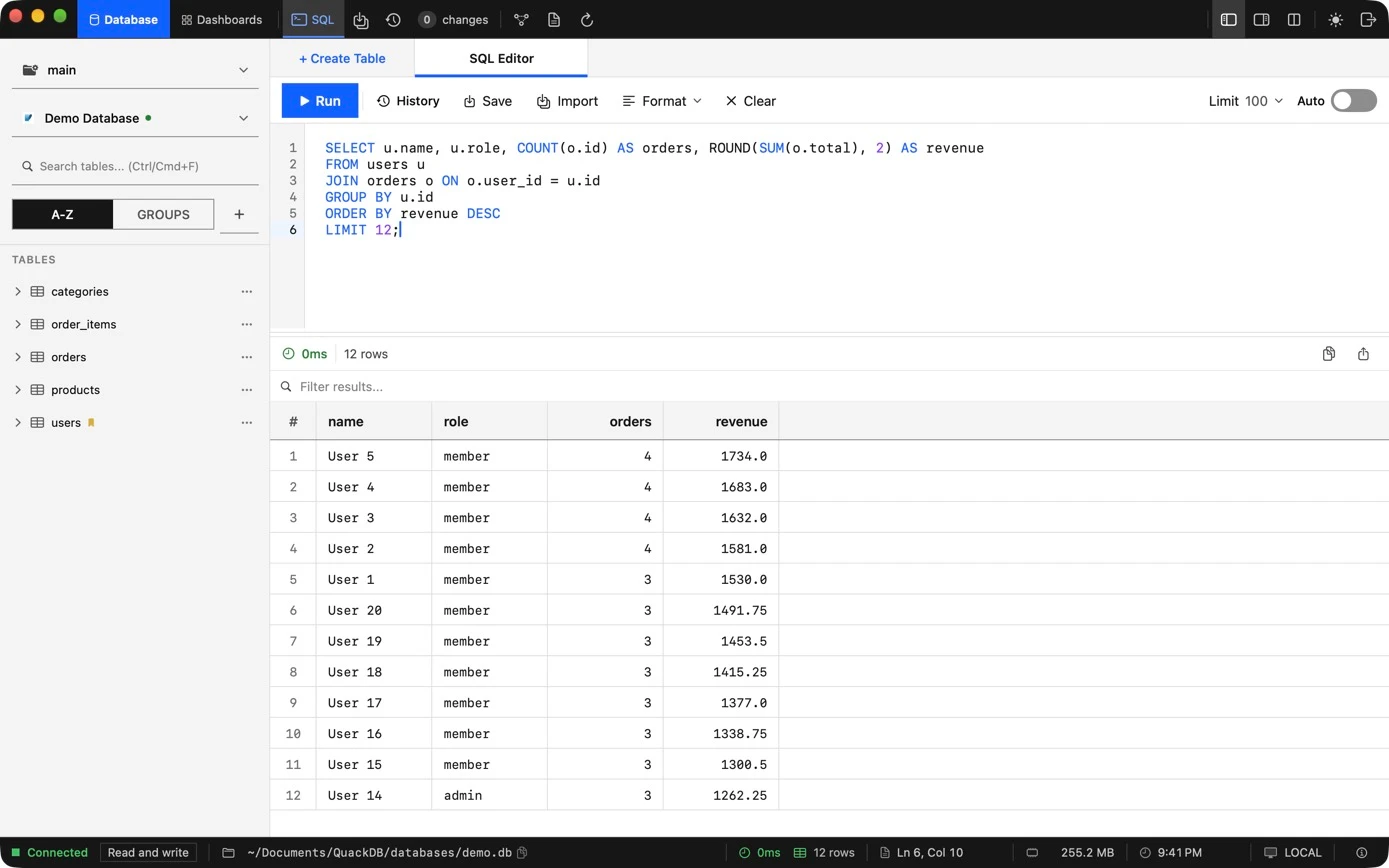
Moving between an editor, a results viewer and a table browser costs more attention than most queries are worth. The QuackDB SQL editor keeps your query and its results on one screen, remembers what you have run, and lets you save the statements worth keeping. Set a row limit and even the biggest tables stay quick to explore.

  • See results the moment you run a query
  • Reuse good queries instead of rewriting them
  • Format SQL so queries stay easy to read
QuackDB SQL editor showing a join query and its results grid

SQL and Python notebooks

Keep the answer, and how you got it.

A number in a report is only as useful as the reasoning behind it. A QuackDB notebook puts the question, the SQL, the result and the chart in one document. Link a Python cell to a query, group and plot the rows with pandas and matplotlib, and reopen the notebook later exactly as you left it.

  • Write the question beside the query that answers it
  • Chart any result with pandas and matplotlib
  • Reopen the statement, output and figure together
A QuackDB notebook with a note cell, a SQL cell showing 12 rows of results, and a Python cell linked to it

Browse and edit tables

Fix data where you find it.

A quick correction should not call for a one-off UPDATE statement. Open a table in the data grid, filter and sort to the rows that matter, and edit them right there. When data has to move, import it or export it in the format the next person expects. Every edit is tracked, so a fast fix is still a safe one.

  • Correct values in place, with undo and redo
  • Find the right rows without writing SQL
  • Move data in and out as CSV, TXT, JSON or SQL
QuackDB data grid showing a users table with filter, sort, import and export controls

Changes and history

Commit your edits like code. Undo them just as easily.

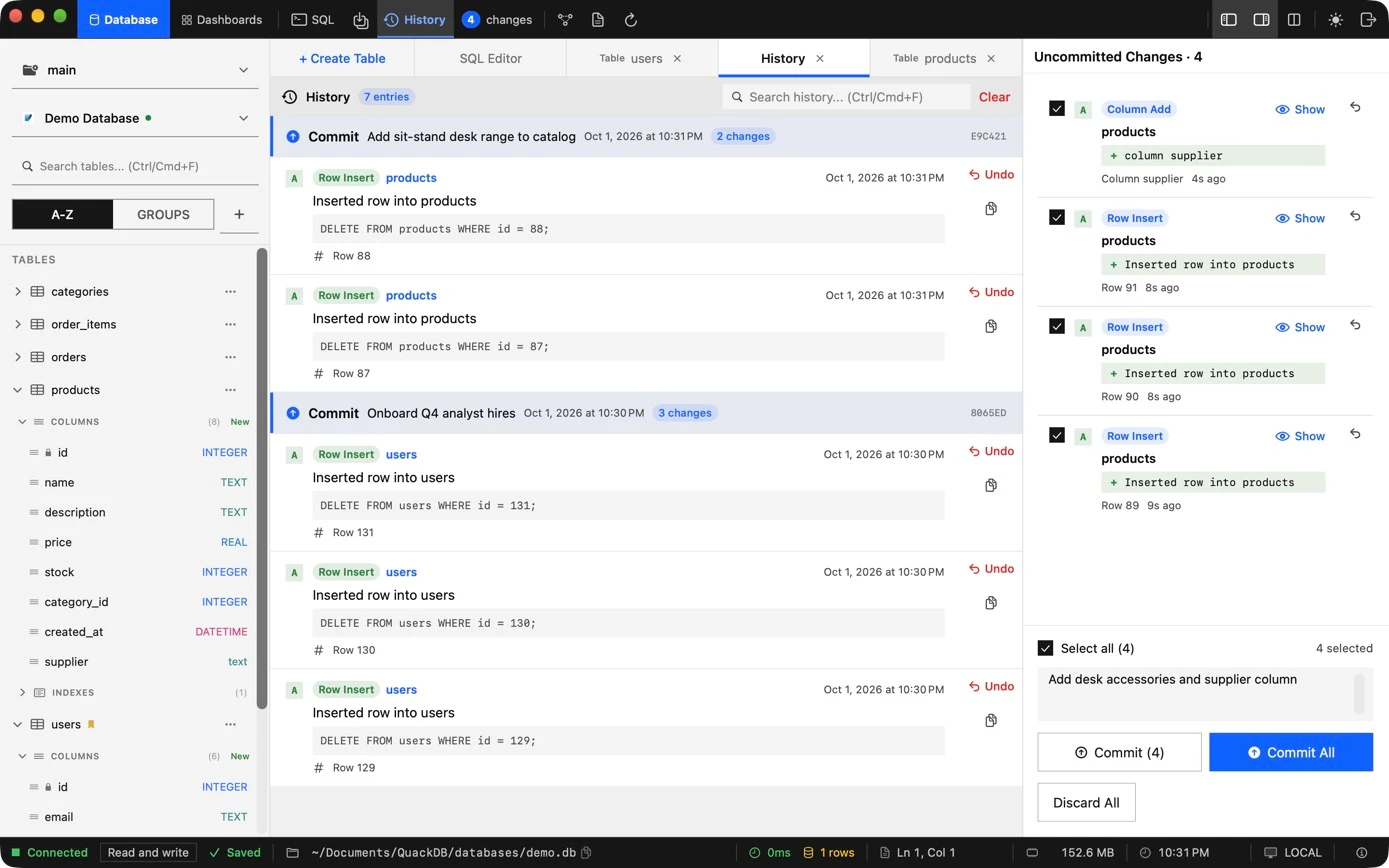
Production data deserves the discipline source code already gets. QuackDB collects your edits as pending changes, so you can read them back before anything is applied, then commit them with a message that explains why. Each commit lands in the change history with a short ID, and if one turns out to be wrong, you undo it from there.

  • Check every edit before it counts
  • Explain each commit in plain words
  • Reverse a mistake from the change history
QuackDB change history listing two commits with their messages and short IDs, alongside a panel of four pending changes with a commit message ready to commit

Database schema diagram

See how your tables connect, then act on it.

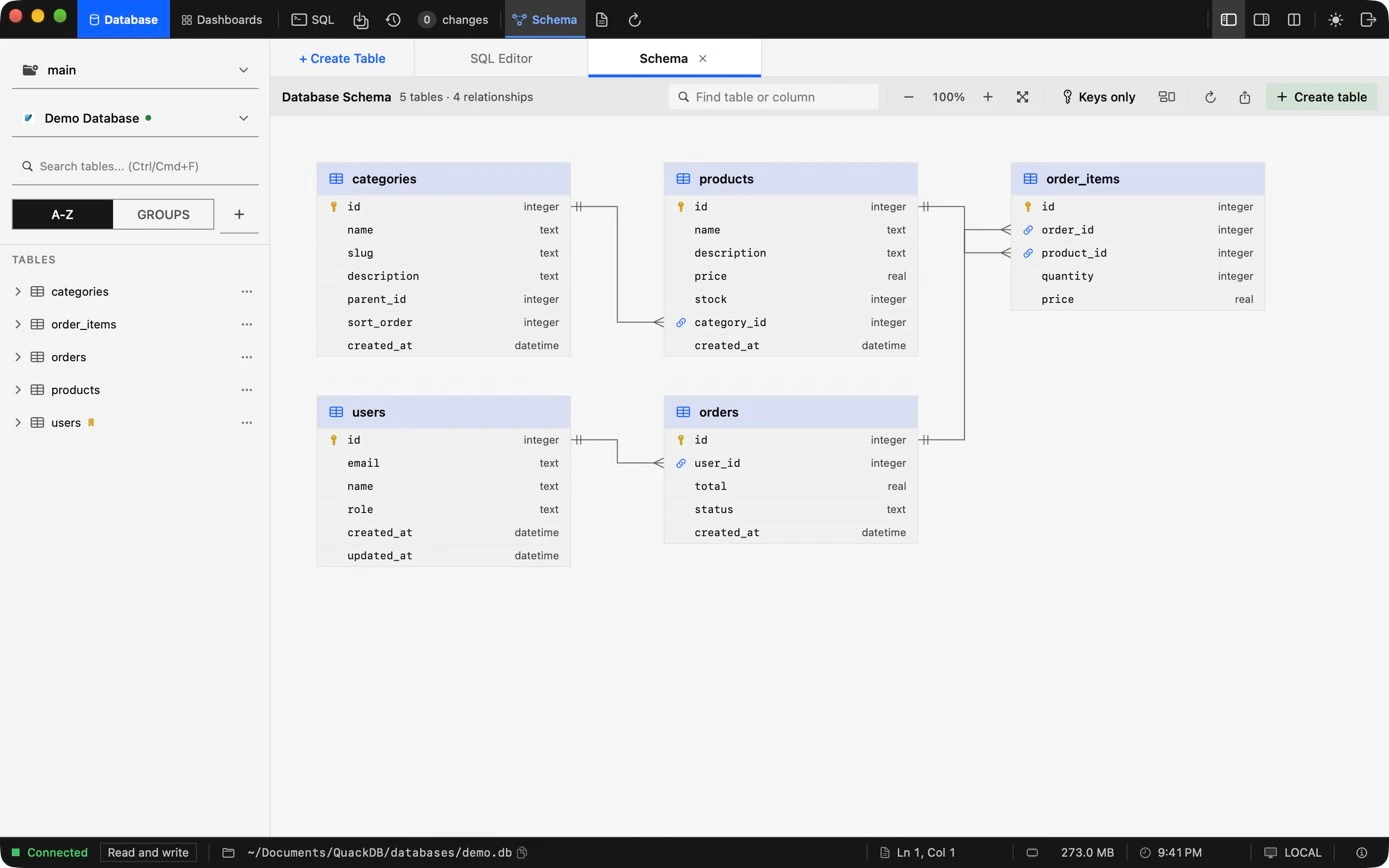
Inheriting a database you did not design is slow, careful work. The QuackDB schema diagram turns the foreign keys already in your database into a map, so you can see how tables relate before you write a single join. Select any table to read its columns, keys and indexes, then open its data or add a column without leaving the diagram.

  • Follow relationships instead of guessing them
  • Arrange the map the way your team thinks
  • Go from understanding to action in one panel
QuackDB schema diagram showing five tables connected by foreign key relationships

Get QuackDB

Two versions. Choose the one that fits.

QuackDB 1.1.0, the native Mac app, is now on the Mac App Store. Prefer the original? Version 1.0.1 is still available to download, and it is free.

1.1.0 · Native for Mac

QuackDB 1.1.0

Rebuilt as a native macOS application with Swift and SwiftUI. Download it from the Mac App Store. It requires macOS 14.6 or later.

Previous version

QuackDB 1.0.1

The original release for Mac is still available, and it is now free. If it already does what you need, there is nothing to buy. Download the installer directly, with no App Store required.

FAQ

Frequently asked questions

Answers to what people ask before they download. If yours is not here, get in touch.

QuackDB is a native Mac database client for people who live in data. It puts your PostgreSQL, MySQL, SQLite, SQL Server and Supabase databases in one workspace, with a SQL editor to ask questions, a data grid to browse and fix data, and a schema diagram to show how everything fits together.

SQLite files, plus PostgreSQL, MySQL, SQL Server and Supabase databases. If your team uses more than one engine, a single database client can cover them all.

The new native version comes through the Mac App Store, and any plans or subscriptions are bought and managed there with your Apple ID. The previous version of QuackDB is free.

QuackDB connects directly from your Mac to your database, so your queries and results never pass through QuackDB servers. Connection credentials are stored in the macOS Keychain. The Privacy Policy explains what the website itself collects.

You can undo it. QuackDB collects your edits as pending changes that you commit or discard. Each commit is recorded in the change history with its message and a short ID, and you can undo a committed change from there.

Yes. QuackDB 1.0 for Mac remains available on the previous version page, and it is now free. The new native version is a separate application.